If you've ever searched for "what is lux" or tried to make sense of a spec sheet listing "300 lux" or "1000 lux," you're not alone. Lux is one of those units that sounds technical but is actually one of the simplest, most practical concepts in lighting. Once you understand it, choosing the right light for a kitchen worktop, a reading chair or a staircase becomes far easier — and it's exactly the number Lightingdesigner.io calculates automatically for every point in your floor plan.
What is lux, in plain terms
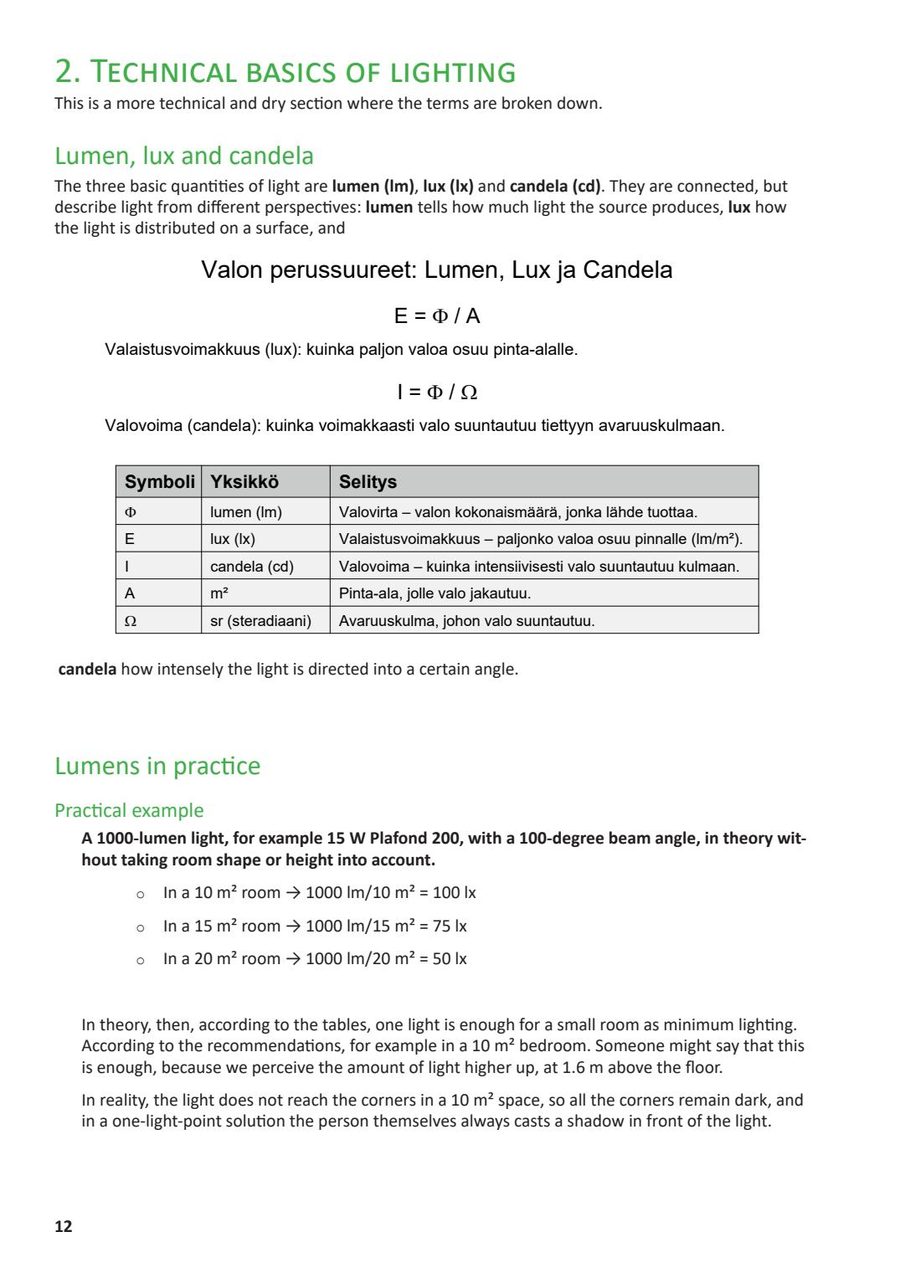
Lux (symbol: lx) measures illuminance — the amount of light that actually falls on a surface, per square meter. One lux equals one lumen of light spread evenly over one square meter. It does not describe how bright a light bulb is in isolation; it describes how much of that light actually reaches the desk, the countertop, the page of a book or the floor of a hallway. That distinction matters enormously in real homes, because two identical light fixtures can produce completely different lux readings on a surface depending on distance, angle, and what's in between.
Lux vs lumen vs candela: what's the difference
Lumen (lm) is the total amount of visible light a source emits in every direction — it's printed on almost every LED product box today and tells you how "powerful" a bulb or strip is in absolute terms. Candela (cd) measures luminous intensity in one specific direction, which matters for spotlights and beam-angle calculations. Lux (lx) is the practical, real-world outcome: how many of those lumens actually land on a given surface once distance, spread and beam angle are accounted for. A 400-lumen downlight mounted directly above a countertop can deliver far more lux there than the same 400-lumen bulb in a large, high-ceilinged room where the light spreads out before reaching any surface.
How lux is measured and calculated
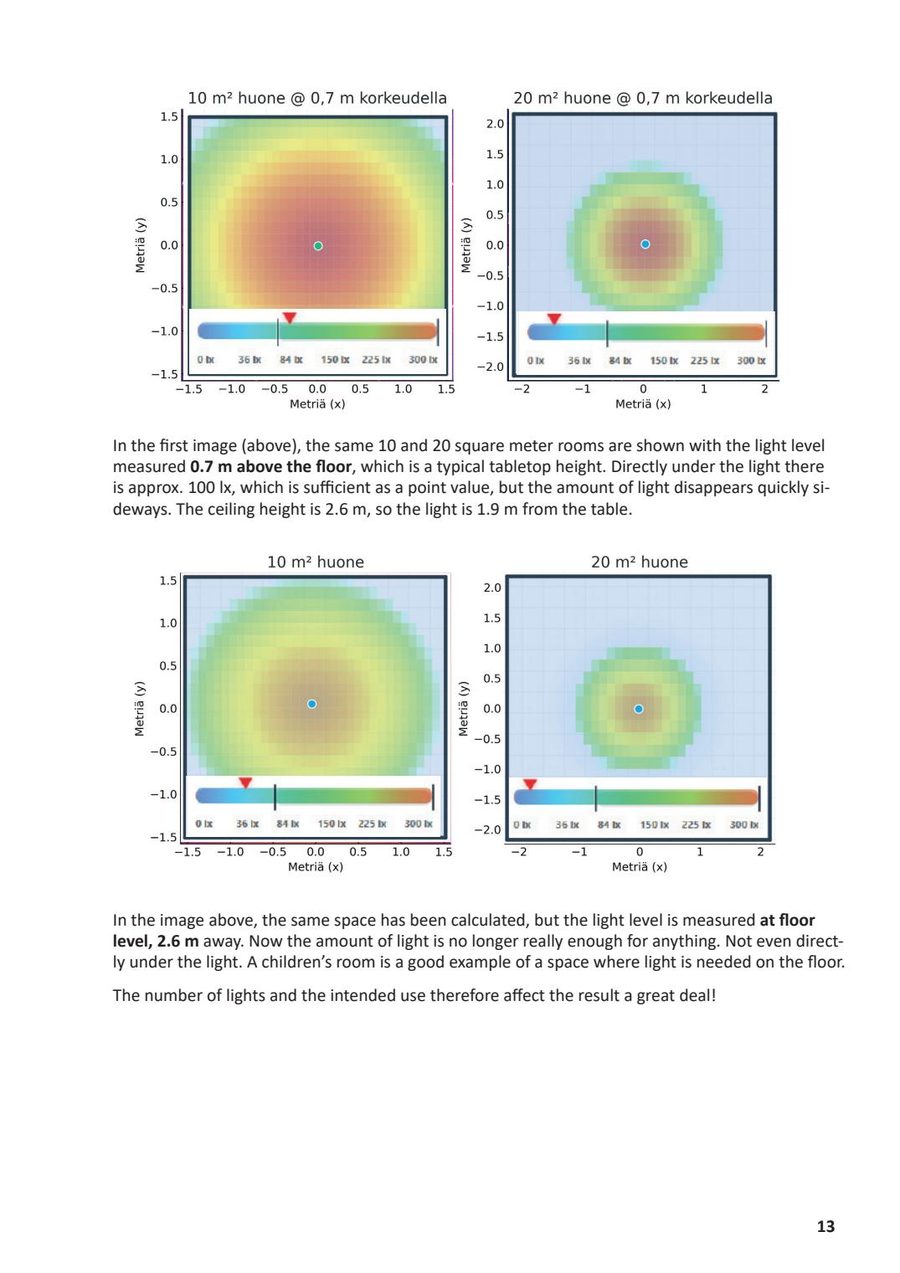
Professionally, lux is measured with a light meter placed on the surface in question, facing upward toward the light source. In practice, calculating lux at the design stage — before any fixture is installed — is more useful, because it lets you catch problems before you buy or install anything. The calculation depends on the light source's lumen output, its beam angle, its mounting height and distance from the surface, and how reflective the surrounding materials are (a white ceiling bounces more light back into a room than a dark one). This is exactly the calculation Lightingdesigner.io runs automatically: draw your room, place your spots and LED strips, and the app's heatmap shows you the resulting lux across every surface in real time, instead of requiring you to do the math by hand.
Lux reference table: recommended levels by room
Recommended lux levels vary by room and by task, because different activities need different amounts of light on the working surface. As a practical starting point:
- Hallways and circulation: roughly 100–150 lux — enough for safe, comfortable movement without glare.
- Living rooms (general/ambient): roughly 150–300 lux, layered with task lighting near reading chairs.
- Bedrooms: roughly 100–200 lux ambient, with 300+ lux available at a reading or vanity area.
- Kitchens (general): roughly 300 lux, rising to 500 lux on the worktop and stove.
- Home offices and desks: roughly 500 lux on the work surface to reduce eye strain.
- Bathrooms (mirror/vanity): roughly 300–500 lux at face height for grooming tasks.
- Staircases: roughly 100–150 lux, with emphasis on even distribution rather than raw brightness.
These are practical starting points, not building-code requirements — actual needs shift with room size, ceiling height, surface color, and the age and preferences of the people using the space. Our companion guide, Lux Levels for Home Lighting, breaks each of these down further with room-by-room reasoning.
What affects how many lux you actually get
Four factors decide whether a fixture's rated lumen output turns into useful lux on your countertop or reading chair: distance (light falls off sharply the further a surface is from the source), beam angle (a narrow spotlight concentrates more lux in a small area than a wide floodlight of the same lumen output), mounting height (a downlight in a 2.4 m ceiling delivers far more lux below it than the same fixture in a 3.5 m ceiling), and surface reflectance (light-colored walls and ceilings bounce light back into the room, effectively increasing usable illuminance, while dark surfaces absorb it). This is why simply buying "more lumens" rarely fixes a dim kitchen worktop — placement and beam angle usually matter more than raw output.
Common lux benchmarks explained
A few numbers come up constantly in lighting discussions, and it helps to know what they mean in practice:
- ~50 lux — dim ambient/mood lighting, comparable to a candlelit room.
- ~100–200 lux — comfortable general living-space lighting; hallways, corridors, living rooms.
- ~300 lux — standard task lighting for kitchens, general offices and reading.
- ~500 lux — focused task lighting for detailed work: worktops, desks, close-up hobbies.
- ~1000 lux — high-precision task lighting, closer to what you'd find in a workshop, studio or professional kitchen prep area — well above typical residential ambient levels.
How Lightingdesigner.io calculates lux automatically
Manually calculating lux for every fixture and surface in a home is tedious and error-prone. Lightingdesigner.io removes that step: import or draw your floor plan, place downlights, spots, tracks and LED strips room by room, and the built-in heatmap instantly shows you the resulting lux distribution across the whole floor — including where it falls short of the recommended levels above. It's the fastest way to go from "how many lux do I need here" to a finished, exportable lighting plan and product list.
Frequently asked questions
What does 300 lux mean? It means 300 lumens of light land on every square meter of the surface being measured — roughly the level recommended for kitchen general lighting or reading.
What does 1000 lux mean? It's a high, precision-task level of light — well above normal home ambient lighting, more typical of detailed work areas or professional kitchens.
Is more lux always better? No. Excess lux, especially from harsh or poorly diffused sources, causes glare and visual fatigue. The goal is matching lux to the task, not maximizing it.
How do I know how many lux my room currently has? A light meter gives an exact reading, but for planning a new layout, a tool like Lightingdesigner.io's heatmap calculates expected lux from your fixture choices before you buy anything.